
AI Bookkeeping Software: What It Can Automate and What Still Needs You

AI can recognize Home Depot. It can’t know what you bought.
It can remember the category you used last time. It can’t know whether today’s purchase was repairs, job materials, equipment, personal, or a split purchase.
That gap is where AI bookkeeping gets useful and where it can go wrong.
Importing transactions, recognizing vendors, remembering patterns, and surfacing likely matches can save real time.
But recognizing a pattern is not the same thing as understanding what happened in the business.
If you’re comparing AI bookkeeping software, the most useful question is not simply “Does it use AI?”
The better question is:
What does the software automate, what does it suggest, and what still requires my business context?
What “AI bookkeeping software” can actually mean
The phrase covers a wide range of products and features.
One system may use AI only to suggest categories based on prior activity.
Another may use it to identify duplicate transactions, match transfers, extract information from receipts, or answer questions about reports.
Another may automatically categorize and post transactions with very little owner review.
Those are very different workflows.
That’s why I would not evaluate a bookkeeping product based on the AI label alone.
I’d look at what the system actually does to the books.
If you want the broader feature checklist first, I laid out the seven things I think simple bookkeeping software should actually help a small business do.
Tasks AI can help automate safely
Some bookkeeping work is repetitive and pattern-heavy. That’s where software can be especially useful.
Importing financial activity
Bringing bank and credit card transactions into the system is a good use of automation. There is no reason a business owner should manually type every routine transaction if reliable data can be imported.
Recognizing familiar vendors
If the software sees the same merchant repeatedly, it can identify the vendor and show prior treatment.
🎯 For example:
Vendor recognized: Adobe
Prior activity: usually Software & Subscriptions
That saves time without pretending the software knows every future Adobe charge must be handled the same way.
Suggesting likely categories
Prior activity can be useful evidence.
If the same monthly charge has consistently been posted to the same category, a suggestion can reduce repetitive work.
The important word is suggestion.
Matching obvious money movements
Software can often help identify likely matches between:
a credit card payment and the matching withdrawal from checking
transfers between bank accounts
duplicate imported transactions
repeated recurring activity
That can prevent double-counting and reduce manual searching.
Flagging unusual activity
AI can also be useful when something breaks a pattern.
A vendor that is normally $49 suddenly charges $4,900.
A recurring deposit is missing.
A transaction appears twice.
A category suddenly increases far beyond its normal range.
Those are good examples of software helping the owner notice something faster.
Where merchant names and bank descriptions fall short
Bank data is useful, but it is incomplete.
A merchant name tells you where money moved.
It does not always tell you why.
Home Depot
A Home Depot charge could be:
repairs
job materials
supplies
equipment
personal
mixed between several purposes
Recognizing the vendor is easy.
Understanding the transaction may not be.
Amazon
Amazon is even less informative because one order can contain several unrelated items.
A single charge might include office supplies, a monitor, something for a customer project, and something personal.
A remembered category can be useful as a starting point.
It should not become an unquestioned rule.
Large deposits
A $20,000 deposit might be sales revenue.
It could also be:
a loan
an owner contribution
a transfer
a customer deposit or prepayment
a refund
proceeds from selling an asset
The amount and bank description alone may not contain enough information to know.
Transactions that often require business context
Some bookkeeping decisions are difficult to automate because the accounting treatment depends on facts outside the bank feed.
Transfers and credit card payments
Money leaving checking does not automatically mean an expense happened.
A transfer between accounts is a movement of cash.
A credit card payment reduces the card balance. The expenses were generally recorded when the individual card purchases occurred.
Treating those withdrawals mechanically as expenses can distort the profit and loss statement.
Loans
Loan proceeds are not ordinary business income.
Loan payments can contain both principal and interest.
The bank may show only one payment amount, while the accounting requires a split.
Payroll
Payroll is rarely explained adequately by the bank transaction alone.
The bookkeeping may need to account for:
gross wages
employee tax withholdings
employer payroll taxes
benefits
liabilities
net payroll withdrawals
The payroll report provides context the bank feed does not.
If the records behind those transactions are scattered across portals, email, and Downloads, this five-home system for organizing business financial records gives them a predictable place to live.
Fixed assets and larger purchases
A large equipment purchase may not belong in the same expense category as ordinary supplies.
Whether something should be treated as an asset can depend on the nature of the purchase and the business's accounting/tax treatment.
Owner activity
Money an owner puts into the business is different from customer revenue.
Money an owner takes out is not automatically a business expense.
The bank feed can show the movement. It cannot know the owner's intent unless the system is given that context.
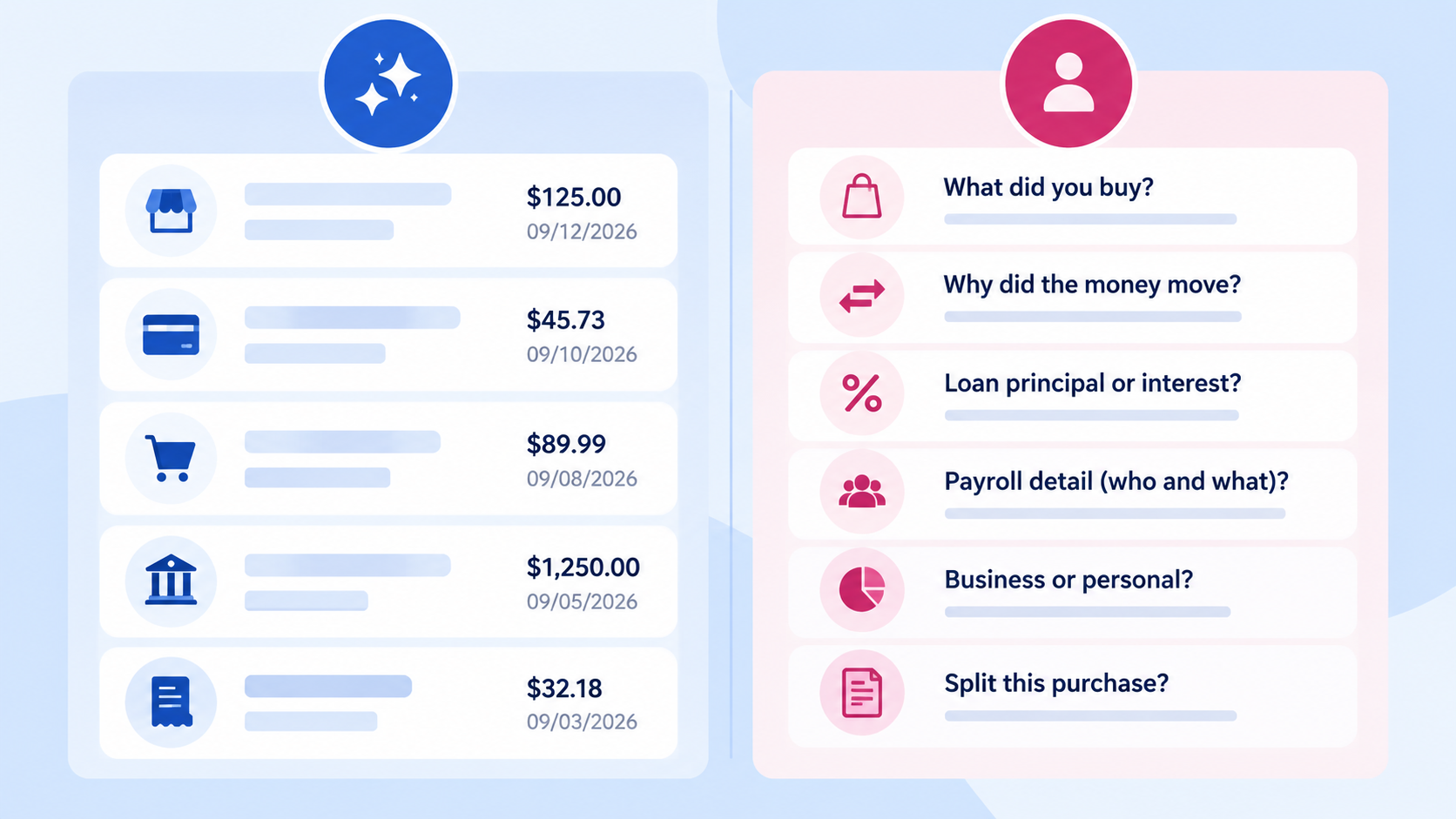
Why review-before-posting matters
A useful bookkeeping system should make the work easier without making the decision invisible.
That means there is a meaningful difference between:
Suggested: “This looks like Software & Subscriptions based on prior activity.”
and
Posted: “This transaction has already changed your books.”
If the system is going to post automatically, I want the criteria to be extremely clear and the activity easy to review.
For more judgment-heavy transactions, I prefer a workflow where the owner can see the suggestion first.
That keeps the owner involved in the part software cannot fully infer: what actually happened in the business.
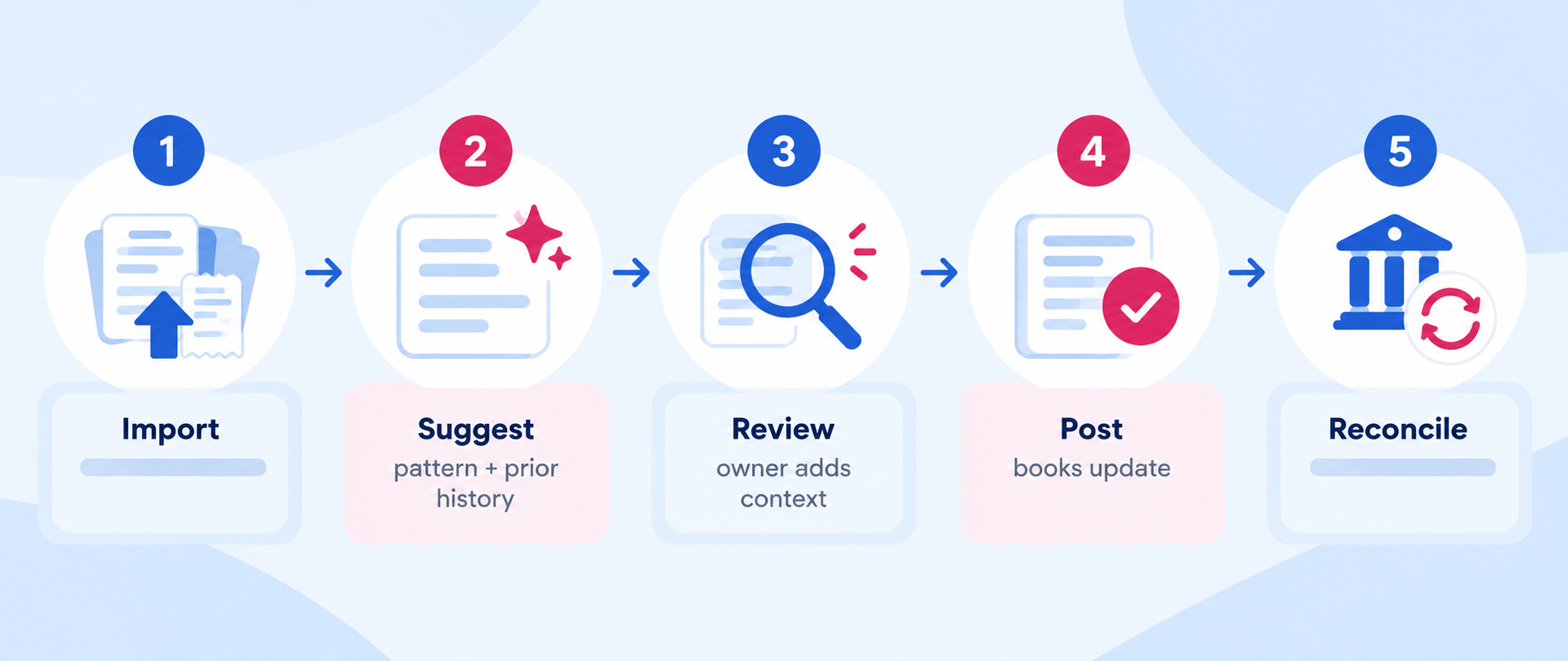
What transparent AI-assisted bookkeeping should look like
The best workflow is not “AI does nothing” or “AI does everything.”
It sits in the middle.
1️⃣ Bring in the data automatically
Reduce unnecessary entry.
2️⃣ Recognize what is reasonably knowable
Vendor, prior treatment, likely match, repeated amount, possible transfer, and similar clues.
3️⃣ Surface the suggestion clearly
Do not make the owner dig to figure out what the system is about to do.
4️⃣ Ask for context when the answer is uncertain
A good system should know when the available data is not enough.
5️⃣ Let the owner confirm or correct the treatment
Especially for transactions that affect income, debt, owner activity, or large purchases.
6️⃣ Keep an audit trail
The owner should be able to tell what changed and why.
7️⃣ Reconcile the accounts
Automation does not replace reconciliation.
A clean review queue is not proof that the books agree with the actual bank and credit-card statements.
Want a practical bookkeeping tool you can actually use?
Subscribe free to Own Your Bookkeeping and I’ll send you the current 1-page Subscriber Tool. You’ll also get practical bookkeeping articles and a new tool each week to help you put what you learn into practice.
Questions to ask before trusting AI bookkeeping software
If you are evaluating a product, I would ask:
Does the software distinguish clearly between suggestions and posted transactions?
Can I see why a category or match is being suggested?
Can I easily override the suggestion?
What types of transactions does it post automatically?
How does it handle transfers and credit-card payments?
What happens when a transaction needs a split?
How does it handle loans, payroll, owner activity, and large purchases?
Can I see a history of what changed?
Does it support real bank and credit-card reconciliation?
If the AI is uncertain, does it ask me or guess?
The answers tell you much more than a generic promise of “AI-powered bookkeeping.”
AI should reduce friction, not reduce understanding
The goal of bookkeeping software should be to make reliable books easier to maintain.
AI can absolutely help with that.
It can recognize patterns faster than you can. It can surface likely answers. It can reduce repetitive clicking and help you notice exceptions.
But your books are still describing your business.
When the business context matters, you should remain able to see the question, understand the suggested answer, and confirm what goes into the books.
That is the standard I care about most.
Common Questions About AI Bookkeeping Software
-
Some tools automate substantial parts of bookkeeping, but the phrase “completely do” can hide important differences. Transactions involving loans, transfers, payroll, owner activity, mixed purchases, unusual deposits, or business-specific context may still require review or clarification. The more useful question is what the software automates versus what it asks you to confirm.
-
Accuracy depends on the task, the quality of the data, the rules the system uses, and whether the transaction contains enough information to infer the correct treatment. Pattern recognition can be very strong while business context is still missing. Reconciliation and review remain important safeguards.
-
Automatic categorization can be useful for highly predictable recurring activity, especially when the rule is transparent and easy to review. For ambiguous or high-impact transactions, a visible suggestion followed by owner confirmation is safer than silent posting.
-
Software can often identify likely transfers when matching amounts and dates exist across accounts, but the system should make the match visible and allow review. A bank withdrawal by itself does not prove that an expense occurred.
-
Look for clear suggestions, review-before-posting where context matters, easy corrections, visible change history, strong transfer handling, reconciliation, and a workflow that keeps you informed about what actually changed in the books.
Next step
If you are doing your own bookkeeping, you do not need software to make every decision for you. You need software that removes repetitive work while keeping the important decisions understandable.
Foundations is being built around that principle. See what Foundations is being built to do.